
Download Fresh Icon Pack – iPhone style icons, icon pack, fresh look, desktop customization, vibrant icons, iOS aesthetic
Overview
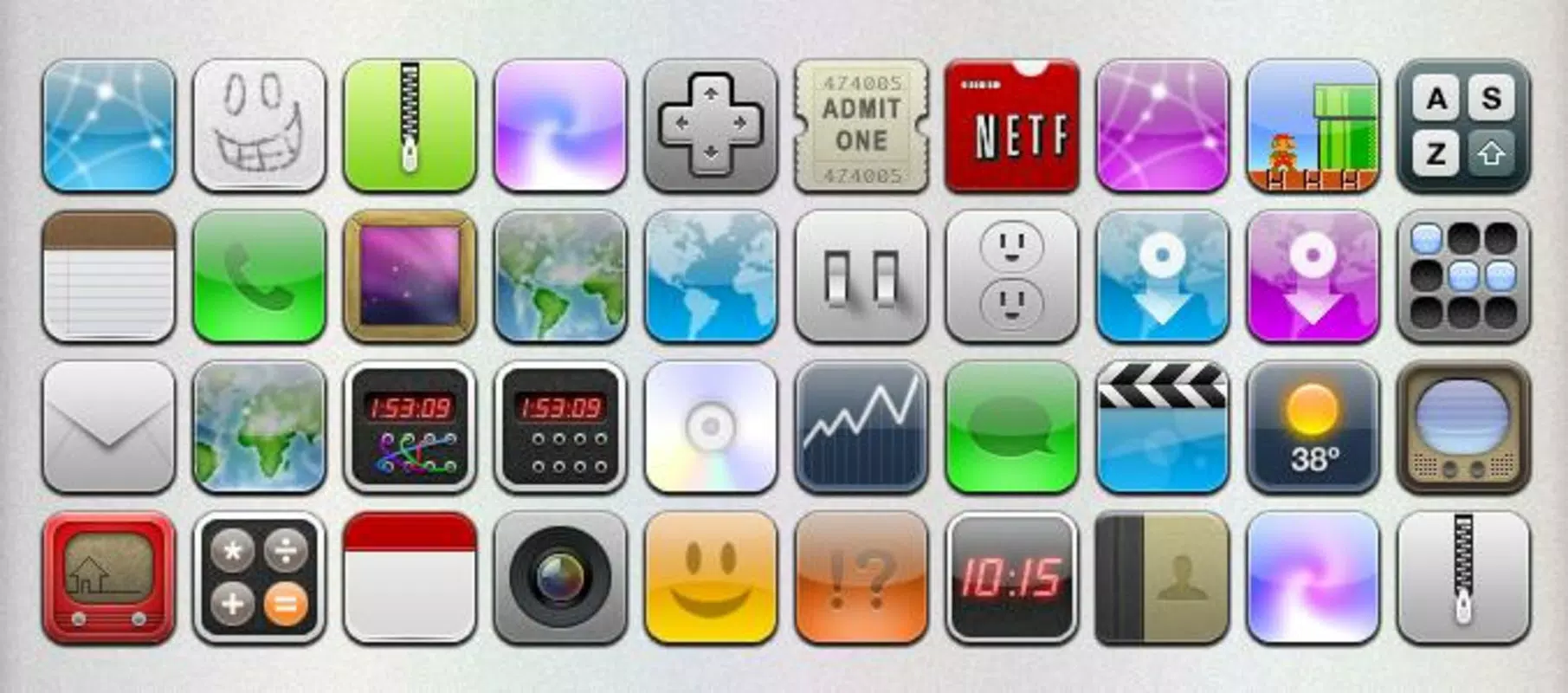
Fresh Icon Pack is a mobile application designed to enhance the visual experience of Android users by introducing an iPhone-style aesthetic to their device interface. The app provides a curated collection of 43 icons, each styled to reflect the vibrant, rounded, and colorful design language associated with iOS. Its primary purpose is to allow users to customize their home screen and app icons, offering a fresh and modern look that stands out from default Android icon sets. This tool is ideal for users who appreciate a sleek, minimalist, and visually cohesive interface that mirrors the design philosophy of Apple’s mobile operating system.
Target users include Android enthusiasts who value personalization, design-conscious individuals, and those seeking a more dynamic and engaging digital environment. The app solves the common problem of visual monotony by offering a ready-to-use icon pack that transforms the look of the device without requiring advanced technical knowledge. It is particularly useful for users who wish to experiment with a different visual identity without altering core system functionality.
Developed by Thomas P. Larson, the app has been available since January 8, 2008, indicating a long-standing presence in the Android ecosystem. Although the developer did not provide additional technical details, the longevity of the app suggests consistent maintenance and user interest. Real-world use cases include personalizing smartphones for aesthetic satisfaction, preparing devices for presentations, or simply refreshing a familiar interface. In the broader app ecosystem, Fresh Icon Pack fills a niche in the productivity and customization category by offering a lightweight, focused solution for visual enhancement.
Key Features & Functionality
- 43 iPhone-Style Icons: The pack includes 43 uniquely designed icons that emulate the iOS aesthetic with rounded shapes, vibrant color palettes, and clean lines. These icons are ideal for users who want a consistent and polished look across their app drawer and home screen.
- Ready-to-Use Format: Each icon is provided as a PNG file with a resolution of 60x60 pixels, ensuring high clarity and compatibility with most Android launchers and customization tools.
- Simple Installation Process: Users can download the pack, decompress the file, and manually replace existing icons using a file manager or compatible launcher. This process requires no root access or complex setup.
- High Visual Consistency: The uniform design language across all icons ensures a cohesive appearance, reducing visual clutter and enhancing the overall user experience.
- Universal Applicability: While the app is designed for Android, the icon format and style make it adaptable to other platforms that support icon replacement, such as certain desktop environments or custom ROMs.
For example, a user can replace default app icons on their Android device with these vibrant icons to create a more visually engaging home screen. This is especially beneficial for users who frequently use their devices for creative work or social media, where a personalized interface can boost motivation and satisfaction. The ease of integration allows even novice users to achieve a professional-looking result in minutes.
Interface, UX & Performance
The Fresh Icon Pack does not feature a traditional user interface, as it is a static icon collection rather than an interactive application. Instead, users interact with the pack through file management tools and compatible launchers. The design philosophy emphasizes simplicity and minimalism, aligning with the iOS aesthetic it emulates. Navigation is not applicable in the conventional sense, as the user manually replaces icons using a file explorer or third-party launcher with icon customization support.
Performance is not impacted by the app itself, as it does not run in the background or consume system resources during normal use. The 12.4 MB file size ensures quick download and minimal storage usage. Although the developer did not list formal performance metrics, the lightweight nature of the package suggests stable operation across a wide range of Android devices, including older models.
Responsiveness depends on the user’s device and launcher capabilities. On devices with modern launchers, icon replacement is typically instantaneous. On older or less optimized systems, users may experience slight delays during the file replacement process. Stability is maintained through the use of standard PNG files, which are universally supported and less prone to rendering issues compared to vector formats.
Platform Compatibility & Technical Requirements
Fresh Icon Pack is available exclusively on the Android platform. The app is compatible with Android devices running any version, although specific minimum OS requirements were not listed by the developer. The file size is 12.4 MB, which is relatively small and suitable for devices with limited storage capacity.
Users are expected to have access to a file manager and a launcher that supports custom icon replacement. While the app does not require root access, certain launchers may have specific settings that need to be enabled for icon customization. The developer did not specify compatibility with specific device models or screen densities, but the 60x60 pixel resolution ensures broad compatibility across most Android displays.
Pros and Cons
- Lightweight at only 12.4 MB
- Free to download and use
- Includes 43 high-quality, iPhone-style icons
- Easy to install with no technical expertise required
- Compatible with most Android launchers
- Requires manual icon replacement via file manager
- No built-in launcher integration or automatic customization
- Does not include icons for all system apps
- No official support for iOS devices
- Developer did not provide update history or changelog
FAQ
Is Fresh Icon Pack free to use?
Yes, the app is available at no cost. There are no in-app purchases or hidden fees.
Can I use this icon pack on iOS devices?
No, the icon pack is designed for Android and is not compatible with iOS. However, the visual style may inspire users to seek similar designs on Apple devices.
Do I need root access to install the icons?
No, root access is not required. The icons can be applied using a file manager and a compatible launcher.
What file format are the icons in?
All icons are provided in PNG format with a resolution of 60x60 pixels.
How do I update the icon pack?
Since the developer did not provide update information, users should check the original source for new versions. The app has not been updated since its release in 2008.
Final Thoughts
Fresh Icon Pack delivers a focused and effective solution for Android users seeking a visual refresh inspired by the iPhone’s iconic design language. With 43 high-quality, vibrant icons and a straightforward installation process, it stands out as a lightweight yet impactful tool for desktop customization. While it lacks modern features like automatic application or launcher integration, its simplicity ensures accessibility for users of all skill levels.
For those who value aesthetics, personal expression, and a clean, modern interface, this app offers tangible value. It’s particularly beneficial for users who enjoy experimenting with their device’s look or want to create a more engaging digital workspace. Despite its age, the app remains functional and relevant in the productivity and utility space.
Download Fresh Icon Pack now


